Capture
Pick a process, choose what to record, and press Record. The timeline starts streaming and the capture timer ticks. Attach and record is on the home page. Auto-profiling is on the features page.
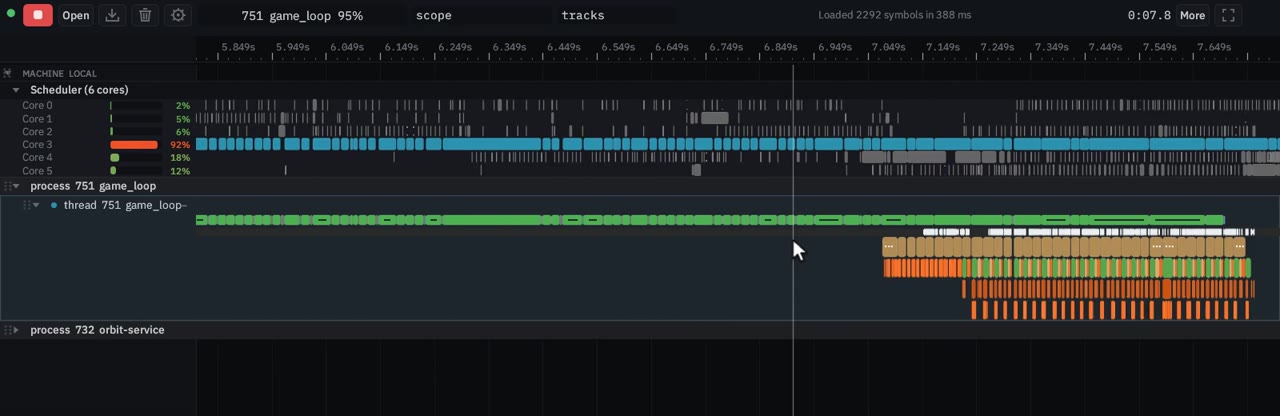
Record, stop, open, save
The red button starts and stops a capture. X does the same, unless the page is showing a file you opened (a static capture has no Record button). On a window narrower than 840 CSS pixels the word on the button is Rec, then Stop.
Open loads a saved Orbit capture (.orbit.zip), a Chrome trace (.json / .json.gz) or a Perfetto trace (.pftrace / .pb). You can also drop the file on the page, or press Ctrl+O (⌘O). Opening a Chrome or Perfetto trace stops a live capture first. Opening a .orbit.zip does not: the service answers busy: stop the capture before opening one until you stop. Traces has the formats.
Save downloads Capture (.orbit.zip), or Selected slice (.orbit.zip) when a time range is selected. Clear empties the capture. Clear is refused while a capture is still running.
What to collect
Settings, COLLECT:
| Switch | Hover | What it records |
|---|---|---|
| CSW | Context switches / Scheduler track | One scheduler lane per core |
| States | Thread state slices | Running, Sleeping, and the other states |
| API | Manual orbit.h API scopes | Scopes from orbit.h, Rust and Python |
| Sample | Callstack sampling | A stack sample per period |
The field beside Sample is a period in milliseconds (ms). It starts at 1.0. The viewer sends it as samples_per_second. The service on main does not read that field: a Linux or Windows capture samples at a fixed 1 kHz.
UNWIND shows DWARF or FP. The viewer sends unwinding as "dwarf" or "frame_pointers". The service unwinds with DWARF (framehop, .eh_frame / .debug_frame) and does not read that field, so FP is not a second unwinder on this build. On Windows the kernel walks the stack itself (StackWalk events) and the field is unused.
Hooks
HOOKS is Frida or Uprobes. Frida is the default, and the only engine on macOS and Windows. Its note reads “requires permission to attach to the target”. Uprobes reads “requires Linux uprobe permissions”. That permission is CAP_SYS_ADMIN. Lowering perf_event_paranoid, or granting only CAP_PERFMON, does not arm a uprobe. See Troubleshooting.
Dedupe appears only while Uprobes is selected. Hover: drop the duplicate entry the kernel reports when a thread migrates inside a uprobe (same stack and instruction pointer, another CPU), and an entry above the last one’s stack. Off, those ghost scopes stay on the timeline. The status line counts them either way.
The HOOKED row:
- Presets… opens instrumentation presets.
- A count: “no functions hooked”, “1 function hooked”, or “N functions hooked”.
- Functions opens the Functions view: every function of the selected process, with a hooked column.
- Unhook all clears the list. It shows once something is hooked.
The service instruments at most 16 functions (MAX_HOOKS). A longer selection is truncated to the first 16, and the log says how many were selected.
After Record the same row says what happened. A clean uprobe arm reads “instrumenting N of M functions”. If nothing armed, the line is amber and names the fix. A function that auto-unhook switched off is marked with a warning on that line.
Right-click a function in the Flat report or a call tree and choose Hook function for dynamic instrumentation (or Unhook function). On a flame-graph bar the same items read Hook function and Unhook function. A function with no file offset says “Not hookable: no file offset for this function”. Record is what arms the list.
Auto-unhook
Auto-unhook is on by default. Past the rate — 100 k calls/s until you change it — the service switches that function off mid-capture, on Frida and on uprobes. The checkbox sits on the HOOKS row, and while it is on a drag field reads “k calls/s”. The hover text: a function that hot is not something to time with a hook, the samples already show it, and hooked it costs the target about a core.
When it fires, the instrumentation line turns amber and an instant marks the moment on the thread. The checkbox and the rate are stored by the service in ~/.config/orbit/settings.json (auto_unhook, max_hook_calls_per_s). A change is written at once and applies to the next Record. 0 on a capture request means never unhook for that capture.
Auto-profiling
On Linux, Auto lets the service choose what to hook. It needs root or CAP_SYS_ADMIN: it uses the kernel hook engine, the one that can arm and disarm during a capture. It is not available on macOS or Windows.
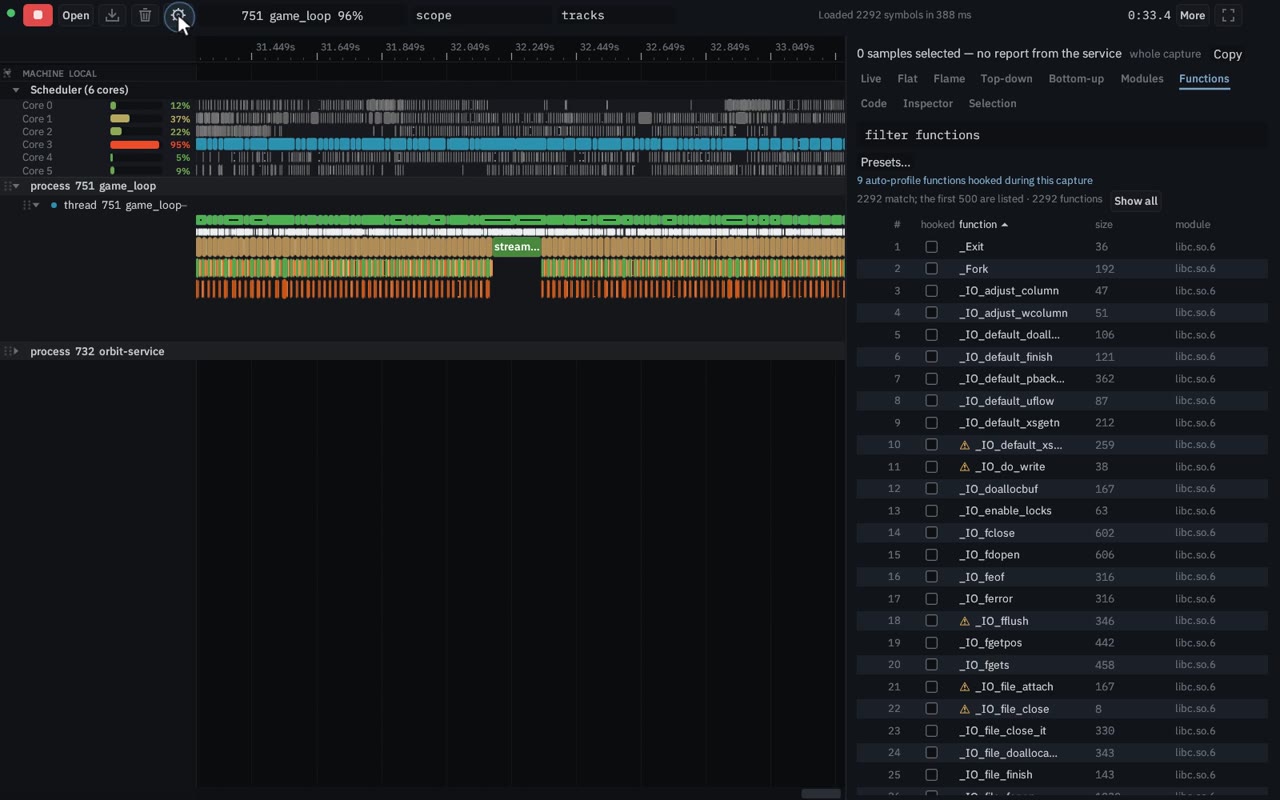
Every two seconds it reads the sampling report of the last five and hooks the next functions it points at, highest inclusive share first, up to three at a time, skipping any the hook-safety check calls unsafe. It keeps a quarter of the budget free, so it stops adding once the set is at 75% of the budget. It unhooks a function that is past half the budget on its own, one that completed no call while it was armed (retried later, waiting longer each time, and left alone after three silent tries), one that was entered and never returned, and the hottest of the rest while the set is over the budget.
The budget starts at 1000 scopes/s (auto_profile_scopes_per_s in ~/.config/orbit/settings.json). It hooks with the kernel engine, the one that can arm mid-capture, inside the 16-hook cap and under Auto-unhook. The status line reads “auto-profiling: N function(s) hooked, X of Y scopes/s”. Each change is an instant auto-profile: hooked … or auto-profile: unhooked … on the target’s main thread. Turning the switch off leaves the hooks that are already armed.
The capture-start body takes "auto_profile": true. POST /api/auto_profile with {"on": true} or {"on": false} toggles it, and /api/status reports auto_profile and auto_profile_status.
Save a slice and share it
Select a time range on the timeline, then use Save → Selected slice (.orbit.zip). The file keeps overlapping scopes whole, samples within the selected range, their callstack frames, and thread/process names. The selected window is stored in the archive alongside the retained events' full bounds.
With S3 sharing configured on the service, stop recording and click Share slice. With no selection, Share uploads the whole capture. When the upload finishes, Copy link copies a link to the website viewer and Open shared capture opens it; both stay until the capture is cleared, re-recorded or replaced. On narrow screens these controls are in More. Sharing is accepted from the service's own viewer opened by IP address or as localhost. Recipients can view the timeline and sampling reports without running Orbit, and download the complete archive. Private-bucket links expire after seven days by default, or sooner if the service's AWS credentials expire.